StreakWars SMS Program
Optional game and account alerts. No marketing messages.
Optional recurring SMS
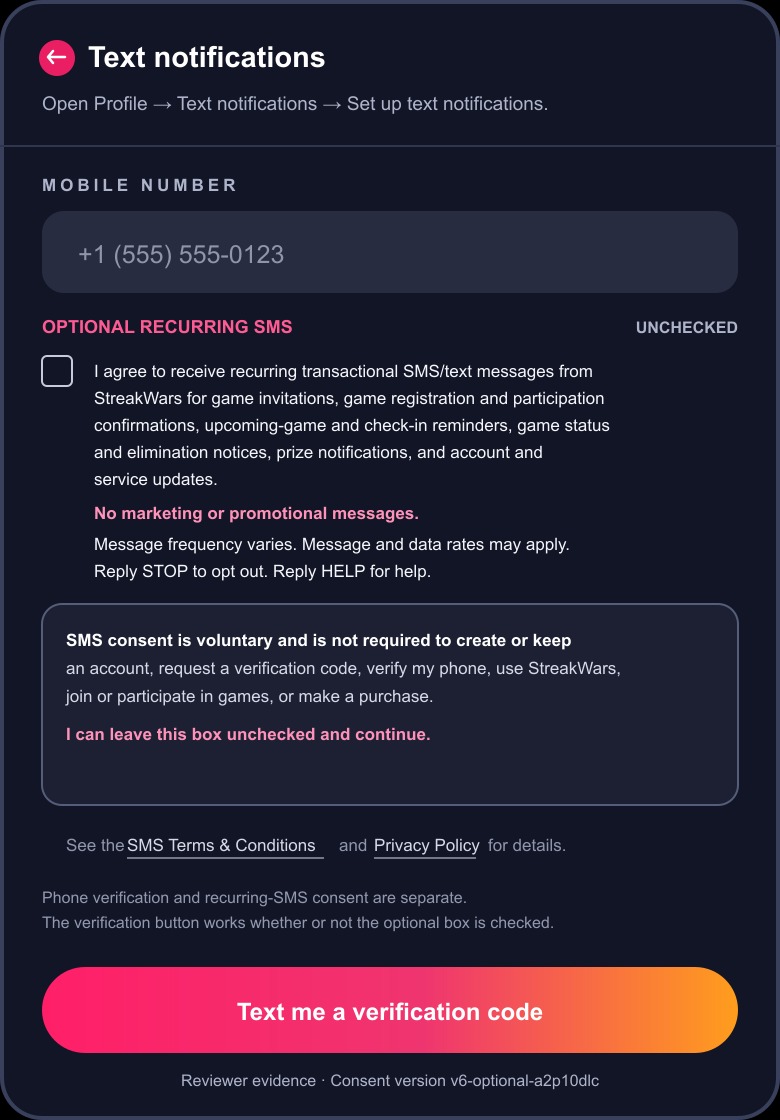
The recurring-SMS checkbox is separate and unchecked by default. Consent is not required to create or keep an account, request a verification code, verify a phone, use StreakWars, join or participate in games, or make a purchase.
Messages covered
StreakWars sends recurring transactional game and account notifications only:
- Game invitations
- Game registration and participation confirmations
- Upcoming-game and check-in reminders
- Game status and elimination notices
- Prize notifications
- Account and service updates
User-requested one-time phone verification codes are separate from this recurring program and never create recurring-SMS consent.
How signup and opt-in work
- Create or keep an email account without providing recurring-SMS consent.
- Sign in and open Profile → Text notifications → Set up text notifications.
- Enter a mobile number. The separate Optional recurring SMS checkbox appears directly below it and is unchecked.
- Check the box voluntarily or leave it unchecked, then select Text me a verification code. The button works either way.
- Enter the requested six-digit code. Phone verification and recurring-SMS consent are stored separately.
- Recurring SMS is activated only after both an affirmative checkbox selection and successful phone verification.
Open the standalone reviewer workflow or open the full-size proof image.
Frequency, rates, opt-out, and help
Message frequency varies.
Message and data rates may apply.
Reply STOP to opt out. Reply HELP for help.
Re-enabling recurring SMS requires the affirmative checkbox in Profile → Text notifications.
For support, email support@streakwars.com.
Carriers are not liable for delayed or undelivered messages.
Mobile data privacy
Mobile information and SMS opt-in/consent data will not be sold, rented, or shared with third parties or affiliates for marketing or promotional purposes.